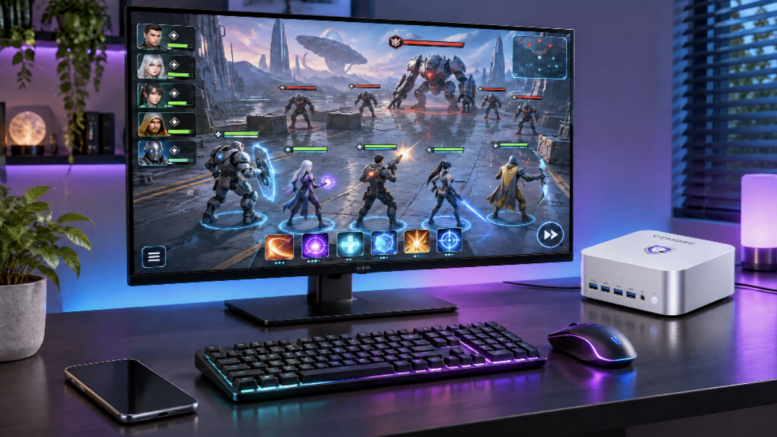
If you play Star Wars: Galaxy of Heroes or Marvel Strike Force, you know the routine. Spend your energy, hit the guild raid, set your Territory Wars defense, check Grand Arena, then come back a few hours later and do it all again. That adds up to a lot of time on a phone that runs hot, drains fast, and squeezes mod stats and ability text into a few inches of glass.
More players are moving that daily grind to a bigger screen, and they’re not buying a full gaming tower to do it. A mini PC that sits quietly next to your monitor or under your TV handles this kind of gaming better than most people expect. Here’s how to make the switch and what to look for.
Why the Daily Grind Plays Better on a Bigger Screen
On a 27-inch monitor, you can actually read secondary stats, track buffs and debuffs across a full 5v5 fight, and compare characters without pinching and zooming. A mouse and keyboard with custom keybinds also makes repetitive battles faster and more precise than tapping.
Then there’s your phone. Moving the grind to a desktop setup frees it up for texts and Discord pings instead of overheating mid-raid.
Developers have noticed the demand. EA’sofficial PC version of Galaxy of Heroes added higher resolutions, anti-aliasing, and 60fps, and it carries your mobile progress over through your EA account. Even a compact mini PC runs it with plenty of headroom.
Three Ways to Play Mobile Games on PC
- Official PC clients. If your game has one, like SWGoH through the EA app, start here. You get the best visuals and controls with no extra setup.
- Google Play Games on PC. Google’s own platform runs a curated catalog of Android games on Windows using the same account as your phone.
- Android emulators. BlueStacks, LDPlayer, and MuMu Player support games without an official PC version, such as Marvel Strike Force, and let you run multiple instances at once. Check your game’s terms of service on macros and multiple accounts before you use those features.
All three run comfortably on a modern mini PC. Which one you use depends on the game, not the hardware.
What Your PC Actually Needs
Mobile games don’t need a massive graphics card. Google’sminimum requirements for Play Games on PC call for four physical CPU cores, 8GB of RAM, an SSD, and hardware virtualization turned on. For a smooth experience, especially with multiple emulator windows open, aim higher:
- CPU: 8 cores or more, since every emulator instance takes its share.
- Memory: 16GB for one account, 32GB if you multi-instance or stream while you play.
- Storage: A fast NVMe SSD for quick loads and game updates.
- Graphics: Today’s high-end integrated graphics easily push these games at high resolutions and frame rates.
- Network: Wired Ethernet keeps arena and raid sessions from dropping on you.
That checklist describes a well-equipped mini PC almost exactly.
Why a Mini PC Fits This Kind of Gaming
Mobile games are played in short sessions spread throughout the day, so the right machine is one you can leave on and forget about. That’s where amini pc shines:
- Always ready. It wakes in seconds, so checking in between raids feels as quick as picking up your phone.
- Quiet. Good cooling keeps fan noise low during long sessions, which matters more here than peak benchmark scores.
- Small footprint. A mini PC fits beside a monitor, behind a TV, or on a crowded desk without dominating the room.
- Real headroom. Multi-core CPUs, 32GB of RAM, and fast SSDs are standard in high-end mini PCs, which is exactly what multi-instance play needs.
You get the comfort of a desktop setup without the size, heat, or noise of a gaming tower.
Choosing the Right Mini PC for How You Play
Match the machine to your routine:
- The daily regular. One account and a set time each day? A mainstream mini PC with 16GB of RAM and an SSD has you covered.
- The multi-instance grinder. Running several emulator windows alongside Discord or a stream calls for a high-end model with more cores and 32GB of RAM.
- The all-in-one player. If you also play PC titles, go flagship. Top-tier integrated graphics handle far more than mobile games.
Brands likeVZMORE build their mini PCs around this kind of all-day use. The AX9 Max pairs a Ryzen AI 9 HX 470 with Radeon 890M graphics for heavy multi-instance sessions, while the iX9 Ultra steps up to Intel Arc graphics for players who want one machine for mobile and PC gaming.
Quick Setup Tips
- Link your mobile account first so your progress follows you.
- Turn on hardware virtualization in the BIOS before installing Google Play Games or an emulator.
- Spend five minutes setting up keybinds for the actions you repeat most.
- Cap the frame rate on each emulator instance to keep your mini PC cool and quiet.
- Keep your phone for quick check-ins on the go, and save the bigger screen for raids and arena planning.
The Bottom Line
A bigger screen won’t change the game, but it changes how the daily grind feels: clearer, faster, and easier on your phone. Figure out how your game runs on PC, match the hardware to how you play, and a mini PC will quietly handle the rest.
FAQ
Do I need a dedicated graphics card to play mobile games on PC?
No. Mobile games are light on graphics, and modern integrated graphics in a mini PC handle them at high resolutions. CPU cores, RAM, and an SSD matter more.
Can a mini PC run multiple emulator instances?
Yes. A mini PC with 8 or more CPU cores and 32GB of RAM can run several instances smoothly. Check your game’s rules on multiple accounts first.
Does Star Wars: Galaxy of Heroes on PC share progress with mobile?
Yes. Link your mobile account to your EA account when you first launch the PC version, and your progress carries over.


Be the first to comment on "Taking Your Mobile Game Grind to a Bigger Screen With a Mini PC"